
The SEO tool ads all say the same thing: sign up, and the rankings follow. Then the dashboard opens, and a whole evening goes into learning what the features do. The site doesn't move, and there's still no clear answer on what to fix first.
The best SEO tools for small business are mostly free, and Google makes the most useful ones. What costs money is acting on what they find: the page that needs rewriting, the slow image, the setting that keeps a page out of Google. Deciding who does that work comes before any paid tool.
We use three tools on the sites we build: Search Console, PageSpeed Insights and Screaming Frog. We don't sell a tool, and no link in this post pays us anything.
Contents
- Google and Bing Show What Paid Tools Can Only Estimate
- 1. Google Search Console (Free)
- 2. Google Business Profile (Free)
- 3. Bing Webmaster Tools (Free)
- Every Problem Free SEO Tools Find Needs Someone to Fix It
- 4. PageSpeed Insights (Free)
- 5. Google Analytics 4 (Free)
- 6. Google Keyword Planner (Free)
- 7. Screaming Frog SEO Spider (Free up to 500 URLs)
- 8. Ahrefs Free (Free)
- A Paid Tool Is Worth Its Fee Once You Watch Competitors
- 9. Semrush (Paid)
- 10. Moz Pro (Paid)
- 11. Mangools (Paid)
- AI Answers Take Clicks, and Two Free Reports Count Them
- The Best SEO Tools for Small Business Are Free
- Questions About the Best SEO Tools for Small Business
- The Data Is Already Sitting in Your Search Console
Google and Bing Show What Paid Tools Can Only Estimate
On its page about third-party SEO tools, Google says: "Third-party tools don't have access to our internal ranking data." The first three tools come from the search engines themselves.
1. Google Search ConsoleFree
Search Console shows the searches your site appeared for, how many people clicked, and which pages Google left out of its index. Its Generative AI report, which reached all sites on August 31, 2026, counts how often you appeared in AI Overviews and AI Mode.
You can check whether Google has your pages with one search: type site:yourbusiness.com into Google and see if your key pages come up. If your site has under 500 pages, Google's own help page for the indexing report says you probably don't need the report, and to open it only if that search finds nothing. It also warns that if you don't understand indexing, the report "will confuse or frustrate you–trust us."
A page left out of the index is a developer's fix: a setting, a redirect, or how the site was built. If a site barely shows up at all, why a site doesn't show up on Google goes through the causes.
The order we work in starts here. Pages Google left out come first, since a page marked "Excluded by 'noindex' tag" can't rank at all, and it's a quick fix for a developer.
Next come pages with plenty of impressions and few clicks, where the page title needs rewriting. Speed work follows, on pages that already rank, and the crawler's warnings come last.
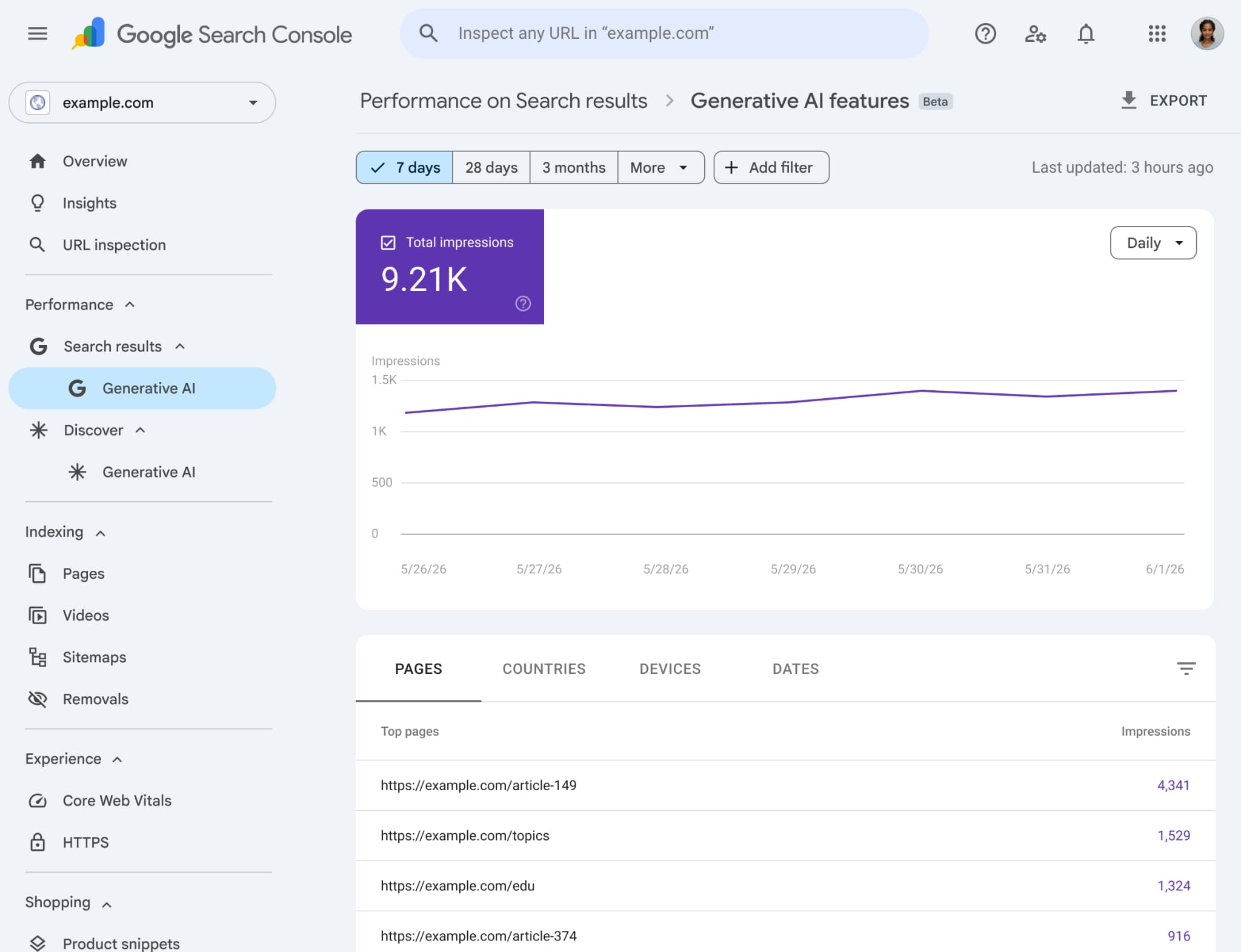
Google’s example Search Console report for example.com (seven days), not our account data. Screenshot: Google. View the original source.
2. Google Business ProfileFree
The Business Profile is your listing on Google Search and Maps, and it matters most when customers come to you or you go to them. Keeping it current is the owner's job: current hours, fresh photos, and a reply to every review.
3. Bing Webmaster ToolsFree
Bing's version of Search Console imports a site straight from Google's. Its AI Performance report, in public preview since February 2026, counts how often Copilot cites your pages. Its findings go to the same developer as Search Console's.
Every Problem Free SEO Tools Find Needs Someone to Fix It
4. PageSpeed InsightsFree
PageSpeed Insights scores how fast a page loads on a phone and names the element that held it back. That element can be a small image waiting behind larger ones further down the page.
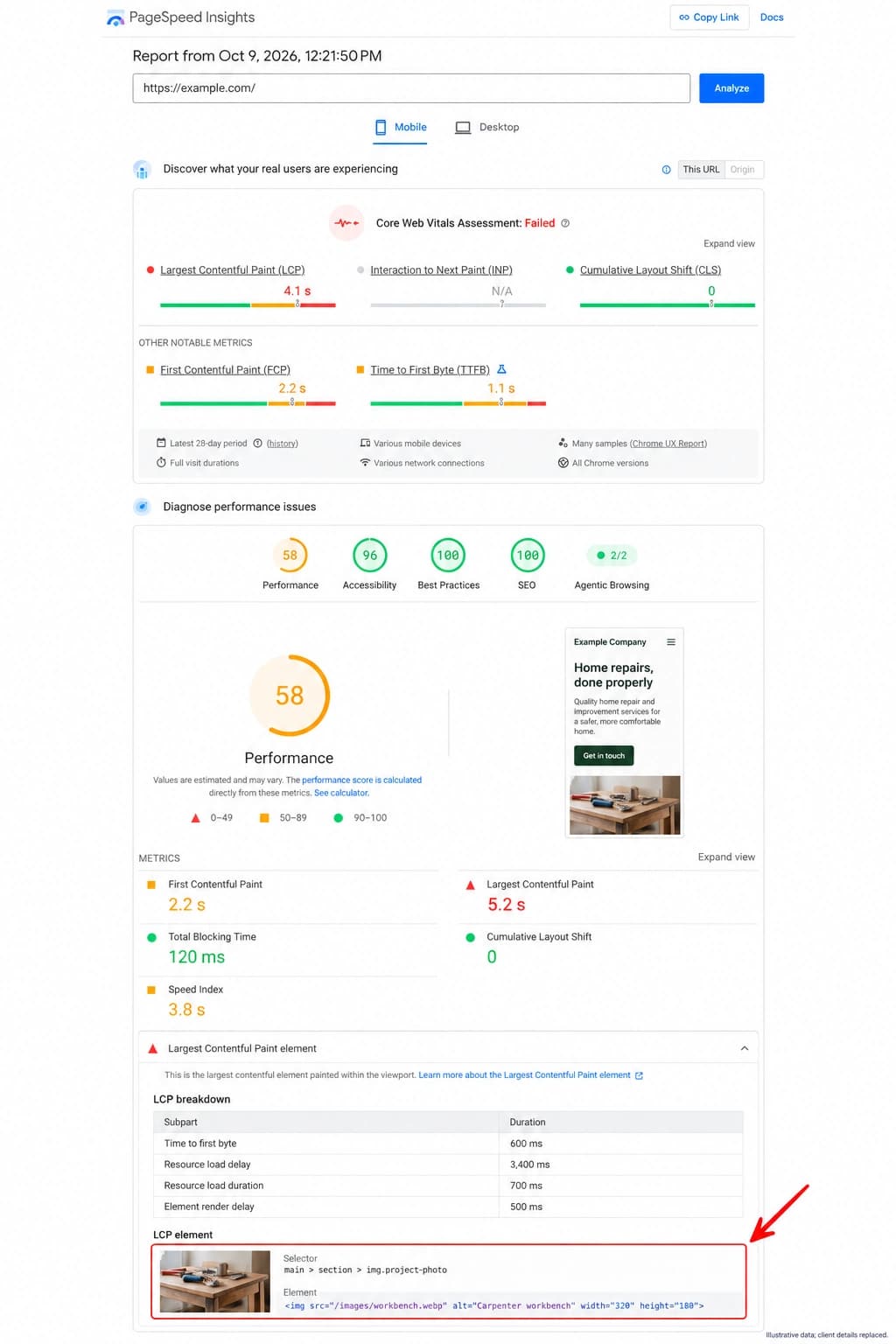
Fixing it is developer work. One image is a quick change; slowness that comes from how the whole site is built can take weeks. In the second case, a website redesign is the better spend.
5. Google Analytics 4Free
Analytics picks up where Search Console stops: which pages people read and whether they sent your form. When the visits come and the messages don't, the problem has moved from search to the page, and a website not converting has its own fixes.
6. Google Keyword PlannerFree
Keyword Planner shows what people search for around your service and roughly how often. It sits inside Google Ads and needs an account with billing details entered. A keyword only pays once a page is written for it, and every site we design starts from the searches that bring customers in, as part of web design.
7. Screaming Frog SEO Spider (Free up to 500 URLs)
Screaming Frog crawls your site the way a search engine does: broken links, missing titles, duplicate descriptions, redirect chains. The free version stops at 500 URLs, and a license is €245 a year.
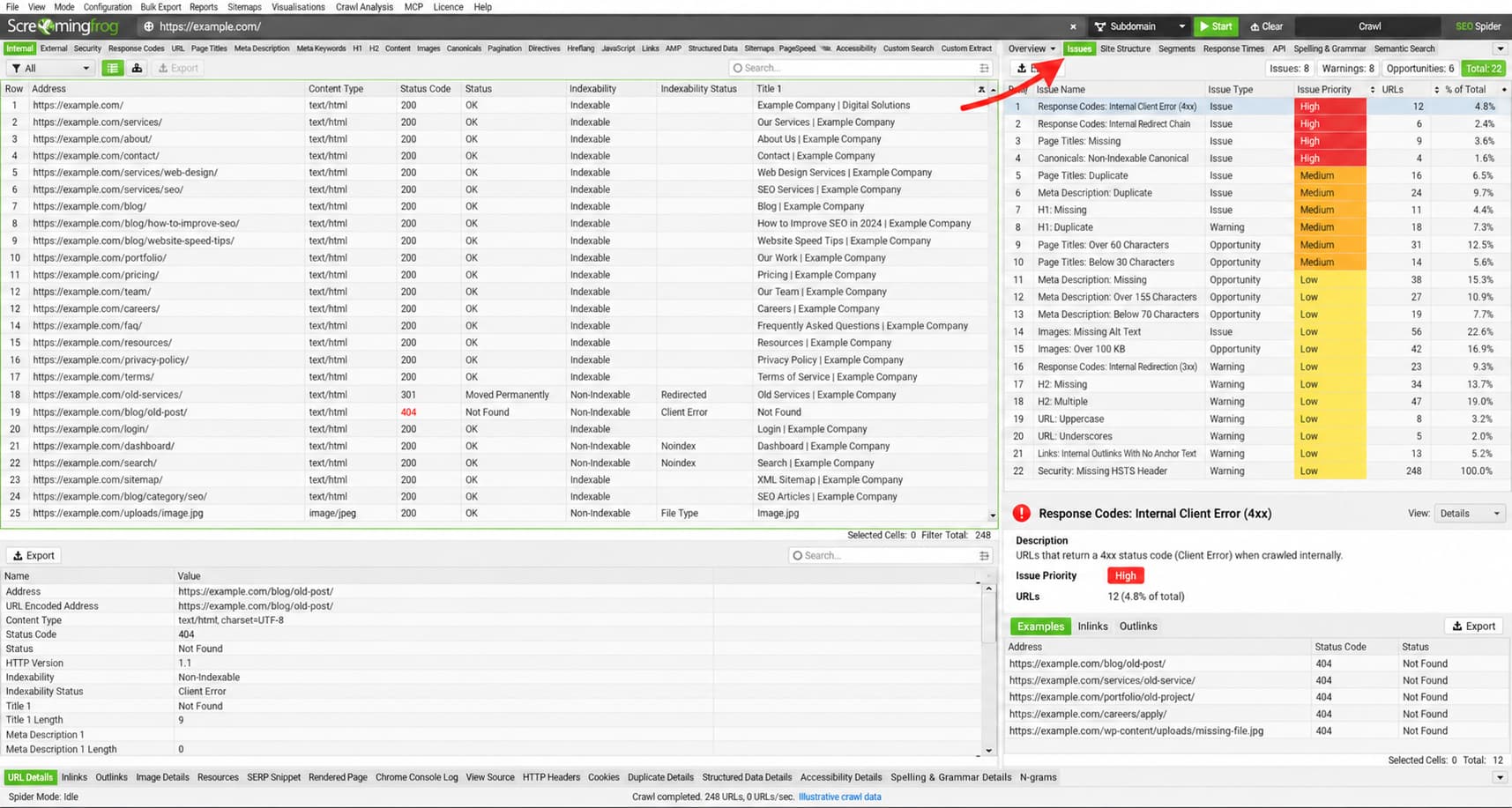
A first crawl of an older site can return a long list of issues. The few that matter are broken internal links, redirect chains, and missing titles on pages that get traffic. Spotting those among the rest takes someone who reads these reports often.
8. Ahrefs FreeFree
Ahrefs Free, formerly Ahrefs Webmaster Tools, checks a site you own for more than 170 common problems and lists the sites linking to yours. Its findings are the same kind as Screaming Frog's, and they land on a developer's desk too. Competitors' data takes a paid plan.
A Paid Tool Is Worth Its Fee Once You Watch Competitors
You need a paid tool if you want to see which searches your competitors rank for and which sites link to them, because the free tools don't show that. One is enough, though, and Google's own page on third-party SEO tools says "using a service or tool doesn't guarantee ranking success." You're better off spending what a second tool would cost on the fixes the first one finds.
9. SemrushPaid
Semrush covers keyword research, competitor data, site audits and rank tracking in one place. The SEO plan costs €134 a month, and tracking in AI answers starts at the Starter plan. It pays off when someone on the team works in it most days.
10. Moz ProPaid
Moz Pro starts at $49 a month for one website. Its Standard plan, $99 a month, includes tracking in AI answers. It suits an owner who wants rankings tracked without learning a bigger suite.
11. MangoolsPaid
Mangools is the cheapest of the three at €226.20 a year, and its KWFinder tool gives a few free lookups a day. It suits keyword research for a handful of service pages.
AI Answers Take Clicks, and Two Free Reports Count Them
When Google shows an AI summary, fewer people click through. Pew Research tracked the browsing of 900 US adults: they clicked a regular result on 8% of visits with a summary and on 15% without one.
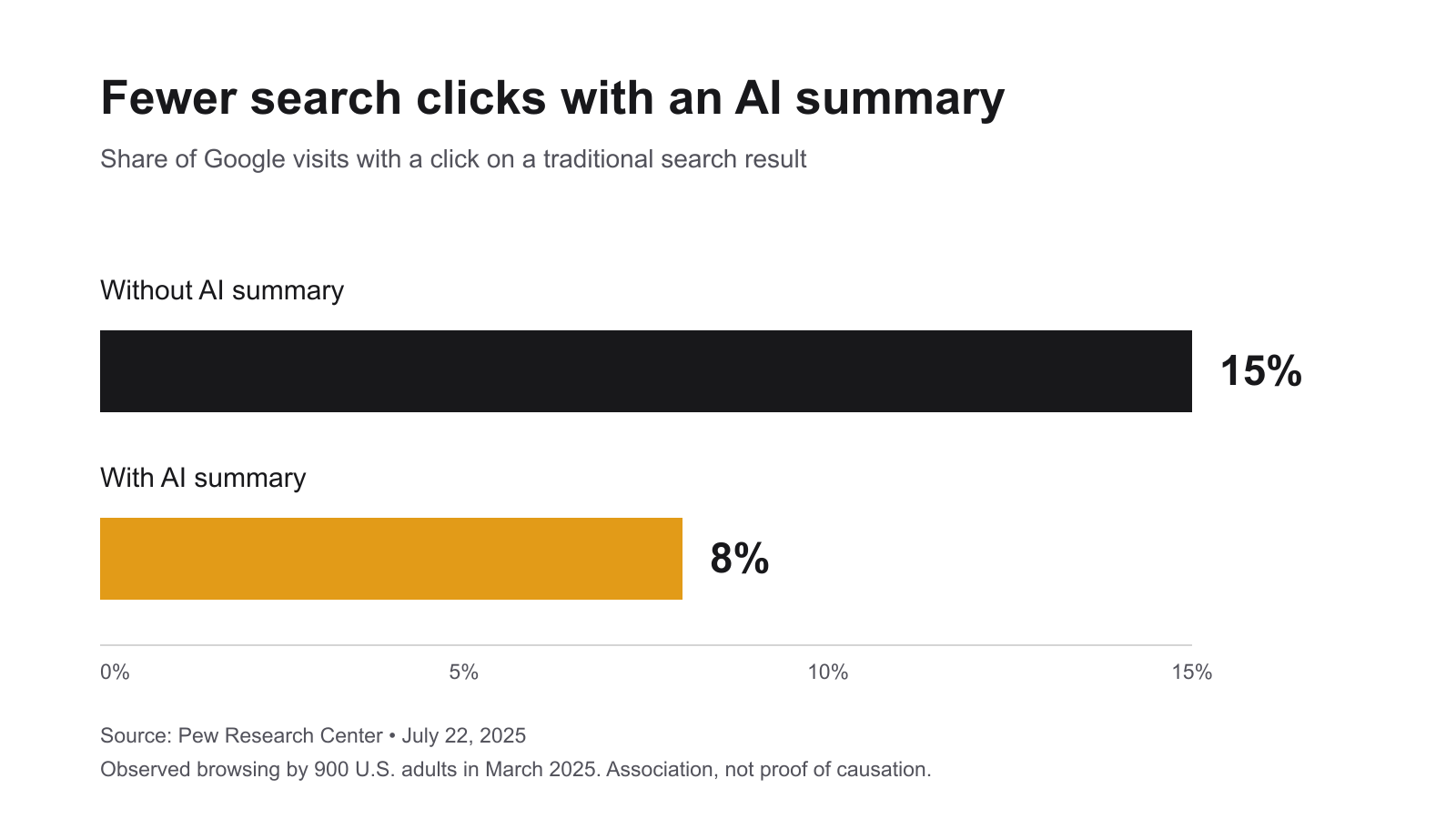
Search Console's Generative AI report and Bing's AI Performance report both count those appearances for free. Getting cited in AI answers at all is a job of its own.
The Best SEO Tools for Small Business Are Free
"If you run a small local business, you can probably do much of the work yourself." That's Google's own line, from its page on whether you need an SEO, and the free tools you'd start with cost nothing.
Handing web work to someone else is the norm for small firms: in 2018, 48.8% of EU firms with 10 to 49 staff mainly used outside suppliers for their web solutions, against 12.5% who used their own staff.
So before picking a tool, the first question is who on the team will open Search Console every month and act on what it shows. If the answer is nobody, the tools sit unused.
Our website maintenance plans send a monthly report on rankings and speed from Standard up, at €129 a month. Premium, at €349, adds SEO and conversion work on pages that get traffic but few leads.
Questions About the Best SEO Tools for Small Business
Google suggests checking Search Console about once a month, and it emails you when it finds a new issue. Doing it yourself works when someone acts on that email. Indexing and speed fixes usually go to a developer.
The free tools cover a small site. Entry plans run from about €19 a month for Mangools to €134 a month for Semrush's SEO plan. Our own prices for having the work done are on our pricing page.
Google's SEO starter guide says some changes take effect in a few hours and others take several months, and suggests waiting a few weeks before judging whether a change worked.
It can be. Google also warns that a bad hire can damage a site. Its advice is to expect an audit with realistic estimates of improvement and of the work involved. Any offer that skips those is one to walk away from.
The Data Is Already Sitting in Your Search Console
Search Console keeps a record of the searches you showed up for, the pages Google left out, and your appearances in AI answers, whether anyone opens it or not. Rankings move when someone reads it every month and fixes what it shows.
Google and Google Search Console are trademarks of Google LLC. This article is independently produced and is not affiliated with, sponsored by, or endorsed by Google.